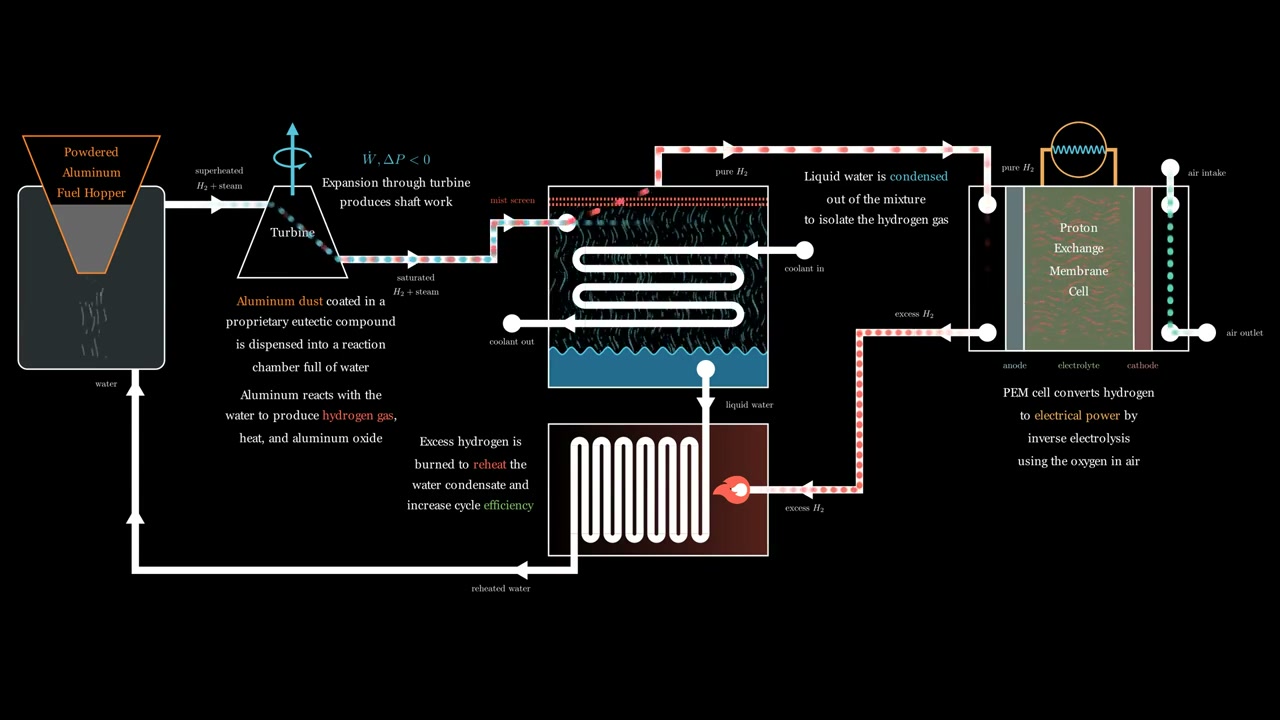
Manim Schematic Video
Technical schematic animation built with Python and Manim to clearly communicate a multi-step engineering process (flows, components, and cause and effect) in a presentation-ready format.
Skills Demonstrated
- Manim scene design: composing clean, readable technical diagrams with consistent layout and spacing.
- Reusable visualization “components” (blocks, arrows, labels, callouts) to keep scenes maintainable.
- Animation timing and hierarchy: guiding attention with staged reveals, emphasis, and minimal clutter.
- Diagram correctness: directional flows, labeled inputs/outputs, and clear subsystem boundaries.
- Presentation-ready rendering: legibility at slide scale, safe margins, and crisp vector-style graphics.
Problem & Context
- Context: produced for Alugen, a fictional startup created for a pitch competition focused on technical communication and engineering presentation skills.
- Goal: explain a complex system quickly using a schematic that stays readable while the narrative evolves.
- Challenge: static diagrams get crowded; viewers lose track of “what moves where” and “what changes next.”
- Solution: a Manim animation that introduces components and flows in logical steps, then consolidates into the full system view.
Process & Constraints
- Storyboarded the system into small beats (component → connection → flow → recap) to reduce cognitive load.
- Built a modular diagram toolkit in Manim:
- Parametric “unit blocks” with standardized sizes, anchors, and label positions.
- Connectors/arrows with consistent stroke/arrowhead sizing and alignment rules.
- Callouts/highlights to emphasize the active subsystem without re-drawing the entire diagram.
- Used Manim’s grouping + transforms to smoothly evolve the schematic (rearrange, zoom, highlight) without visual jumps.
- Optimized for clarity:
- Large type and short labels (only what’s necessary on-screen at any moment).
- Incremental reveals (avoid “everything at once” diagrams).
- Consistent geometry (straight runs, aligned nodes, predictable reading order).
- Rendered at presentation-friendly settings and verified readability in-slide before final export.
Results & Impact
- Produced a clean, narration-friendly schematic video that makes the system easier to follow than a single static slide.
- Reduced ambiguity by showing directionality and sequencing (what happens first, what feeds what, what returns/recirculates).
- Created a reusable Manim template for future technical explainers (swap labels/blocks, keep the style + animation language).
Team & Contribution
- Individual work: storyboard → Manim implementation → rendering/export → presentation integration.
- Iterated on pacing and label density based on peer feedback to maximize clarity.
Media